

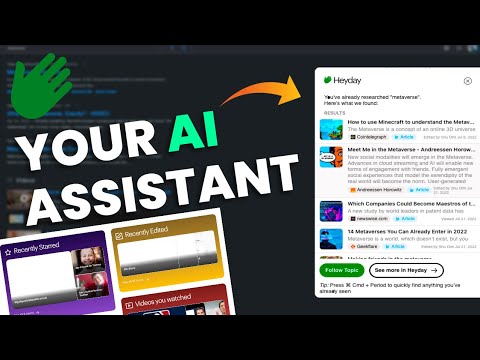
Revolutionize data management with an AI-powered second brain for seamless recall and content creation.
Gallery
1 item
About Heyday
Key Features
- Universal Assistant for summarizing and answering questions
- Writing Assistant for drafting content based on past insights
- Topic Assistant for organizing relevant information
- Automatic Call Recaps (Zoom integration)
- Contextual knowledge resurfacing
- Secure data encryption and privacy controls
- Integration with Email, Calendar, and Slack
Pros and Cons
Pros
- Enhanced recall acting as an external memory bank
- Seamless passive integration requiring minimal setup
- Strong focus on user privacy and data security
- Time-saving automated meeting notes and summaries
Cons
- Initial familiarization period required for new users
- Call recap features are primarily optimized for Zoom
- Requires a paid subscription, no permanent free tier
Pricing
Connect with Heyday
Frequently Asked Questions
Heyday's Zoom integration automatically records and transcribes your Zoom calls. It then uses AI to summarize the key topics discussed, action items assigned, and important decisions made, making it easy to revisit crucial information without rewatching entire recordings. The recap is added to your Heyday knowledge base, searchable and available for contextual resurfacing.
Upon cancellation, your data remains securely stored for a limited period. Heyday provides options to export your data in a common format (details on specific formats are available in our help center) before complete deletion, ensuring you retain access to your accumulated knowledge. This allows you to transition your information to another system if desired.
Currently, Heyday's Writing Assistant primarily utilizes information from web pages you've visited and that Heyday has saved. While direct integration with Google Drive or Dropbox for document access isn't yet available, the content from those documents can be surfaced by Heyday if you open and view them in your browser.
Heyday prioritizes user privacy and employs robust security measures to protect your data. This includes encryption of data both in transit and at rest, adherence to strict data access controls, and regular security audits. We are committed to transparency and provide detailed information about our security practices on our website.
We are constantly evaluating and prioritizing new integrations based on user demand. While we don't have a specific timeline to share for Microsoft Teams or Notion integration, we encourage you to submit a feature request via our support channels. Your feedback helps us shape the future roadmap of Heyday.
Similar AI Tools to Heyday

Mindverse
Your personalized AI second brain for smarter workflows and autonomous agents.

Langotalk
Master languages 6x faster with personalized AI conversation partners
Essence App
Optimize productivity and well-being with cycle-synced AI insights


Socratic by Google
Unlock your learning potential with Google's AI-powered study companion.

Jigso
Your AI-powered workplace sidekick for seamless task automation and data retrieval.